Secure logins so a client cannot impersonate another user’s External ID or claim email and SMS subscriptions they do not own. Generally available on the native Android SDK 5.9.0+, iOS SDK 5.8.0+, and Web SDK 160900+. Not yet supported on cross-platform SDKs.
Generate a JWT on your server and pass it to OneSignal.login so a client cannot impersonate another External ID. The same token can authorize adding email and SMS subscriptions and selected User REST API calls.Identity Verification is generally available on the native Android, iOS, and Web SDKs. Coming soon to cross-platform SDKs.
Coming soon. login(externalId, jwt) works today, but updateUserJwt and the userJwtInvalidated event are not in the wrappers yet.
React Native and Expo, Flutter, Unity, Cordova and Ionic, Capacitor, .NET MAUI
Not yet supported
Unsupported SDKs have no way to pass a JWT to login. Support for them is coming soon.Sites that load the Web SDK from the OneSignal CDN (/sdks/web/v16/) get 160900 and later automatically.Enable Identity Verification to secure:
Logging in users
Adding email subscriptions
Adding SMS subscriptions
Modifying user identities and aliases
The dashboard lets you turn on Token Identity Verification for any app, even if your app uses an SDK that cannot send a JWT. The toggle applies to the whole app, across every platform.If any client in the app uses a cross-platform SDK, do not turn on the toggle. Once it is on, OneSignal rejects requests from those clients that create or update users and subscriptions. login, addEmail, and addSms fail, and new devices on those clients cannot register a push subscription.You can still generate keys and build JWT signing on your server now. Only the toggle enforces verification.
Prerequisites
An existing OneSignal app with a configured push platform.
Every client that calls login uses a supported SDK: the native Android SDK 5.9.0+, the native iOS SDK 5.8.0+, or the Web SDK 160900+.
A backend that authenticates your users and can sign JWTs.
Access to Settings > Keys & IDs in the OneSignal dashboard. The Identity Verification section is available for every app. You do not need to contact support.
Generate keys
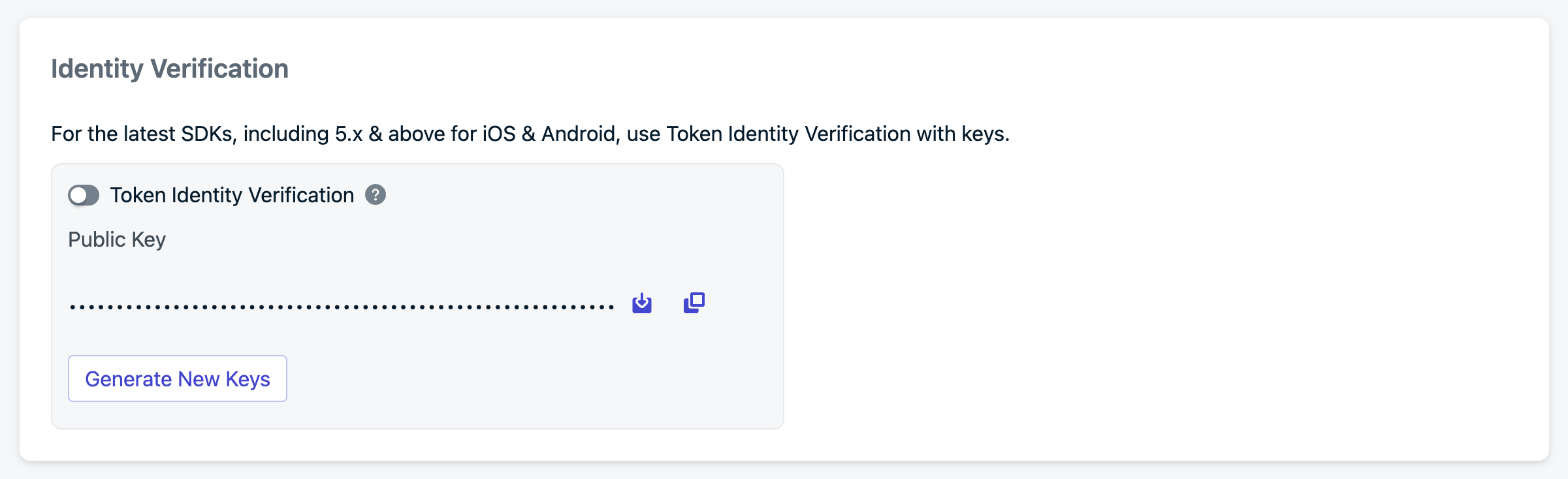
Complete these steps in order: generate keys, create the JWT, then add it to your app. Do not turn on the Token Identity Verification toggle until your backend can mint JWTs and your app can pass them to login.Log in to your OneSignal account and go to Settings > Keys & IDs > Identity Verification.
Identity Verification configuration
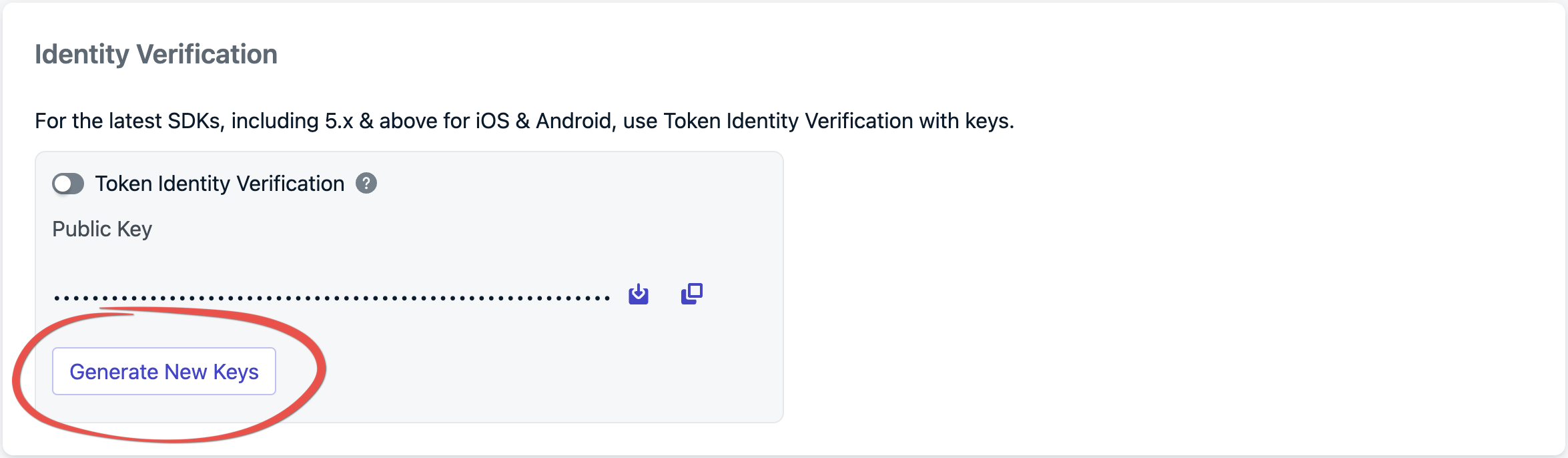
Click Generate New Keys to create a new key pair.
Creating new key pair
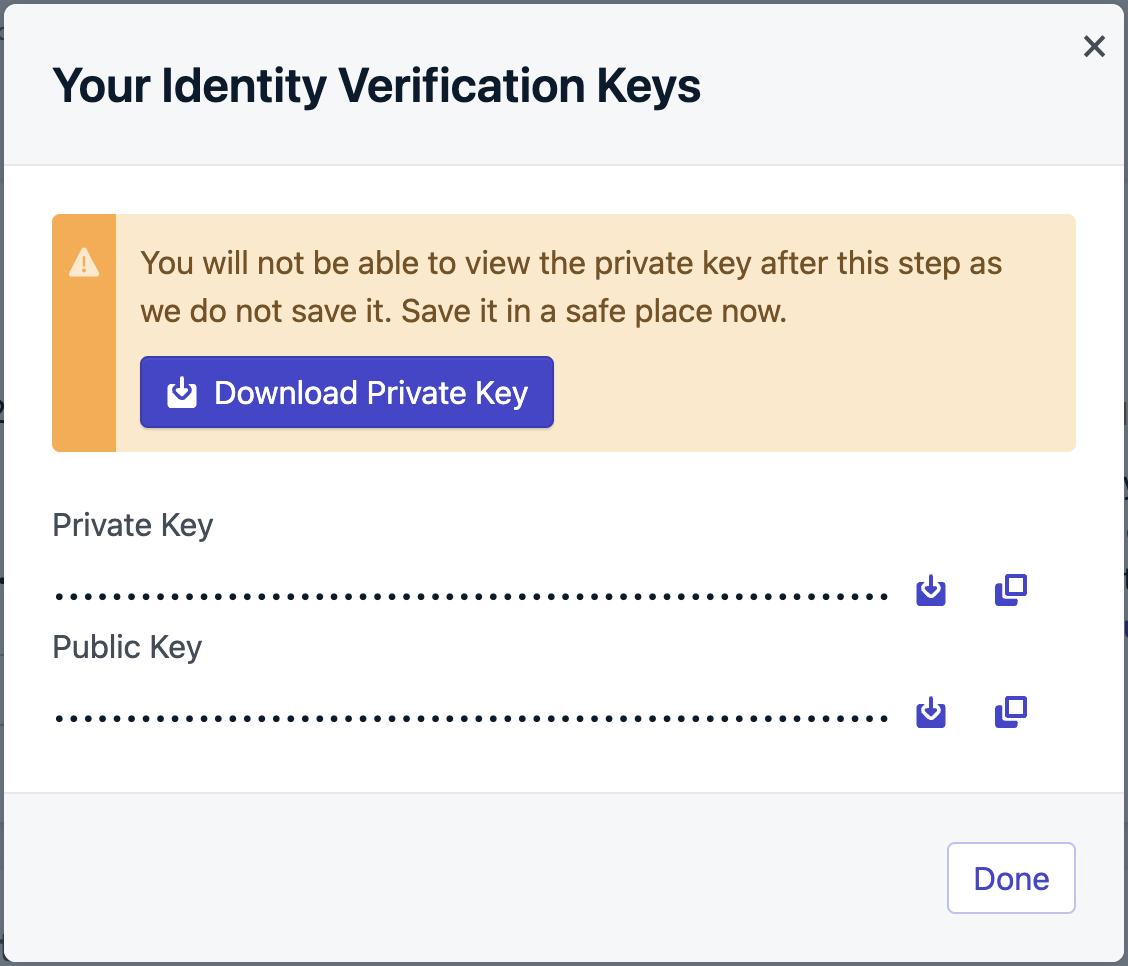
Download the PEM file or copy the private key and store it securely. This private key is not an App API key. Use it only to sign Identity Verification JWTs.
Identity Verification key pair
Always store private keys in a secure environment, such as a key management system. Never expose private keys in client-side code, public repositories, or logs.
You now have a private key stored on your server and a public key held by OneSignal.
Create the JWT
Authenticate the user with your own server before you sign a token. When that auth succeeds, sign an ES256 JWT with the claims below and return it to the device in your auth response. If your app has no backend, stand up a small server whose only job is to verify users and sign these tokens. Never sign JWTs on the device.
JWT payload
Claim
Required
Description
iss
Yes
Your OneSignal App ID.
exp
Yes
Expiration as a Unix timestamp in seconds, not milliseconds. Set it no more than 1 hour in the future. OneSignal rejects expired tokens.
identity
Yes
Object that includes external_id. This value must match the External ID you pass to OneSignal.login().
subscriptions
No
Array of objects with type (Email or SMS) and token. Here token is the email address or E.164 phone number, not the JWT. Include this claim before you call addEmail or addSms.
Signing the JWT
Sign the JWT with the ES256 algorithm (ECDSA using P-256 and SHA-256). Other algorithms are rejected. Use a JWT library rather than assembling the token by hand.Example using jsonwebtoken. Pass the PEM private key you downloaded in the previous step:
Store the PEM private key with its line breaks intact. Many environment variable systems strip newlines, which makes ES256 signing fail. Preserve the literal \n characters, or base64-encode the key and decode it at runtime.
Verify your JWT
Log or return the string from signOneSignalJWT(), then decode it to confirm the payload. jwt.io decodes tokens in your browser, but treat a real user’s token as a secret and use a test token when pasting into third-party tools. The decoded payload must look like this:
Confirm all of the following before you call login:
iss matches your OneSignal App ID from Settings > Keys & IDs
identity.external_id matches the value you will pass to OneSignal.login()
exp is in the future and expressed in seconds
Including subscriptions
Include email and SMS in the JWT at login when you already have those values. If they arrive later, mint a new JWT that includes the subscriptions claim and pass it to updateUserJwt before you call addEmail or addSms. See Adding subscriptions.
Call login with the External ID and the JWT. Until Token Identity Verification is enabled in the dashboard, the SDK does not send the JWT, so you can ship this app update before you turn on the toggle. After you enable the toggle, login without a valid JWT fails.
On success, OneSignal associates the device’s subscription with your External ID and the user becomes an identified user.Web: the promise from login resolves when OneSignal accepts the login. If OneSignal rejects the JWT, the promise rejects, the SDK fires userJwtInvalidated, and the SDK retries the login after you call updateUserJwt. With Token Identity Verification on, if you call login without a JWT, the promise does not settle until you supply one with updateUserJwt.Android 5.11.0 and later: to set the user’s email, phone number, tags, and aliases in the same request, pass the JWT as the third argument to login(external_id, profile). Include the profile’s email and phone number in the JWT’s subscriptions claim. See Adding subscriptions.
// login(external_id, profile) is a suspend function. Call it from a coroutine.val profile = OneSignalUserProfile.builder() .setEmail("user@example.com") .setSms("+15551234567") .build()val loginResult = OneSignal.login(externalId, profile, onesignalJWT)
OneSignalUserProfile profile = OneSignalUserProfile.builder() .setEmail("user@example.com") .setSms("+15551234567") .build();// Continue.with requires Android API level 24 or later. The callback may not run on the main thread.OneSignal.login(externalId, profile, onesignalJWT, Continue.with(continueResult -> { // Handle the OneSignalResult<LoginData> in continueResult.getData()}));
If OneSignal rejects the JWT, loginResult fails with BACKEND_ERROR and HTTP status 401, and the SDK fires the JWT invalidated event described in the next step. The SDK keeps the login queued and retries it after you call updateUserJwt.
2
Handle JWT lifecycle events
When OneSignal rejects a JWT (for example, because it expired), the SDK fires a JWT invalidated event. Fetch a new token from your backend and pass it to updateUserJwt. Requests that need the token wait until you supply it. You can use the same endpoint to mint a token that includes email or SMS if the original login token did not.Add the listener at app startup, before you call login:
Android: add it in Application.onCreate. The listener only receives events that fire after you add it, and it is called on a background thread.
iOS: the SDK holds the listener weakly, so keep a strong reference to it. It is called on the main thread, so fetch the token asynchronously. If an event fired before you added the listener, the SDK delivers it when you add the listener.
Web: add it with OneSignal.User.addEventListener("userJwtInvalidated", listener) inside OneSignalDeferred.push, before you call login. The listener only receives events that fire after you add it. The SDK calls each listener asynchronously, and a listener that throws does not stop the other listeners.
// Called on a background thread, so a blocking network call is OK here.OneSignal.addUserJwtInvalidatedListener(event -> { String externalId = event.getExternalId(); String onesignalJWT = fetchOneSignalJwt(externalId); OneSignal.updateUserJwt(externalId, onesignalJWT);});
// Called on a background thread, so a blocking network call is OK here.OneSignal.addUserJwtInvalidatedListener { event -> val externalId = event.externalId val onesignalJWT = fetchOneSignalJwt(externalId) OneSignal.updateUserJwt(externalId, onesignalJWT)}
OneSignal.addUserJwtInvalidatedListener { event -> val externalId = event.externalId appScope.launch { val onesignalJWT = fetchOneSignalJwt(externalId) OneSignal.updateUserJwtSuspend(externalId, onesignalJWT) }}
import OneSignalFramework// The app delegate lives for the whole app session, so the SDK's weak reference stays valid.class AppDelegate: UIResponder, UIApplicationDelegate, OSUserJwtInvalidatedListener { func application(_ application: UIApplication, didFinishLaunchingWithOptions launchOptions: [UIApplication.LaunchOptionsKey: Any]?) -> Bool { OneSignal.addUserJwtInvalidatedListener(self) return true } // Called on the main thread. Fetch the token without blocking it. func onUserJwtInvalidated(event: OSUserJwtInvalidatedEvent) { let externalId = event.externalId Task { let onesignalJWT = try await fetchOneSignalJwt(externalId: externalId) OneSignal.updateUserJwt(externalId: externalId, token: onesignalJWT) } }}
@import OneSignalFramework;@interface MyListener : NSObject <OSUserJwtInvalidatedListener>@end@implementation MyListener// Called on the main thread. Fetch the token without blocking it.- (void)onUserJwtInvalidatedWithEvent:(OSUserJwtInvalidatedEvent * _Nonnull)event { NSString *externalId = event.externalId; [self fetchOneSignalJwt:externalId completion:^(NSString *onesignalJWT) { [OneSignal updateUserJwt:externalId withToken:onesignalJWT]; }];}@end// The SDK holds the listener weakly. Store it in a property that lives as long as your app.self.jwtListener = [MyListener new];[OneSignal addUserJwtInvalidatedListener:self.jwtListener];// To stop listening:[OneSignal removeUserJwtInvalidatedListener:self.jwtListener];
Replace fetchOneSignalJwt with a call to your backend. Do not sign JWTs on the device.With this listener in place, an expired token is replaced automatically and the session continues without forcing the user to log in again.
3
Enable Token Identity Verification in the dashboard
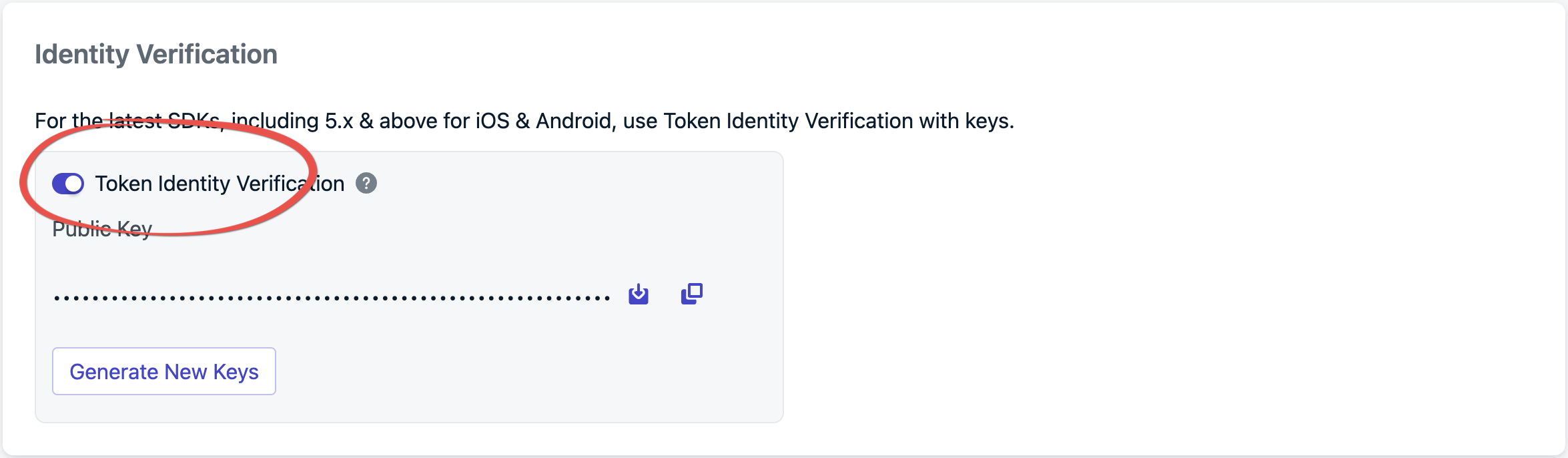
From Settings > Keys & IDs, turn on Token Identity Verification.
Enabling Token Identity Verification
Before you turn it on, confirm:
No client in this app uses a cross-platform SDK. See Supported SDKs.
Most of your users are on an app version that passes a JWT to login. Older app versions still installed on devices cannot send a JWT, so their requests fail too.
Your server sends a JWT for the User REST APIs it calls.
From now on, OneSignal rejects any login or gated REST API call that does not include a valid JWT. See What changes when the toggle is on.Mobile apps pick up the change at their next launch. Web pages can take up to 1 hour to pick it up, because the web SDK configuration is cached.
What changes when the toggle is on
Login:login requires a valid JWT whose identity.external_id matches the External ID.
Logged-out devices: the SDK does not create anonymous users on OneSignal. On a new install, the device does not register a push subscription until the app calls login with a valid JWT, so it cannot receive push notifications before then. If you send push to users before they log in, plan for this before you turn on the toggle.
Web visitors: anonymous visitors cannot have a web push subscription. If a visitor allows push before logging in, the SDK keeps the subscription in the browser and sends it to OneSignal when login runs with a valid JWT. Until then, the visitor gets no push and no welcome notification, and OneSignal.User.PushSubscription.id may not be set. Sites that send push to visitors who never log in should not turn on the toggle.
Order on web: call login(externalId, jwt) before you prompt for push and before addEmail or addSms.
Logout:logout() disables the device’s push subscription. Calling login with a JWT restores it. See the FAQ.
Email and SMS:addEmail and addSms require a JWT that includes the address in its subscriptions claim. See Adding subscriptions.
REST API: the User and Subscription endpoints require Authorization: Bearer YOUR_ONESIGNAL_JWT. See REST API.
Adding subscriptions
If the login JWT already includes the email or phone number in subscriptions, login associates those subscriptions with the user. You do not need a second call.On Android 5.11.0 and later, login(external_id, profile) sends the profile’s email and phone number in the login request. Include each of those addresses in the login JWT’s subscriptions claim. If the address is not in the JWT yet, mint a new token that includes it, call updateUserJwt, then call addEmail or addSms. Do this on every platform. addEmail / addSms alone is not enough once Token Identity Verification is on.fetchOneSignalJwtWithEmail and fetchOneSignalJwtWithSms are placeholders for your own backend call that mints a JWT with the subscriptions claim.
Identity Verification JWTs are not App API keys. Other endpoints (for example Create message) still use Authorization: Key YOUR_APP_API_KEY. See Keys & IDs.When Token Identity Verification is enabled, the User and Subscription endpoints below authenticate with the identity JWT instead:
Authorization: Bearer YOUR_ONESIGNAL_JWT
Mint that JWT the same way as for SDK login. The identity.external_id in the token must match the user the request operates on.
curl -X GET 'https://api.onesignal.com/apps/YOUR_APP_ID/users/by/external_id/YOUR_EXTERNAL_ID' \
  -H 'Authorization: Bearer YOUR_ONESIGNAL_JWT'
Troubleshooting
Symptom
Likely cause
Fix
login(external_id, profile) fails with BACKEND_ERROR and HTTP status 401
OneSignal rejected the JWT
Fetch a new JWT in your JWT invalidated listener and pass it to updateUserJwt. The SDK retries the login.
login seems to do nothing after you enable the toggle
The JWT is missing, expired, or signed with an algorithm other than ES256
Pass a valid ES256 JWT whose exp is in the future.
A gated REST API call returns 401 Unauthorized
Missing or invalid Authorization: Bearer JWT, or identity.external_id does not match the target user
Send a current JWT whose identity.external_id matches the user in the request path.
exp is rejected even though the token looks valid
exp was set in milliseconds instead of seconds
Set exp to a Unix timestamp in seconds.
New installs have no push subscription after you enable the toggle
The user has not logged in. Anonymous users are not created while the toggle is on.
Call login with a valid JWT as soon as the user is authenticated.
React Native, Flutter, or other cross-platform users stopped updating after you enabled the toggle
Those SDKs cannot send a JWT yet
Turn off Token Identity Verification. Turn it back on only when every client uses a supported SDK.
The JWT invalidated listener never fires on Android
The listener was added after the event fired
Add the listener in Application.onCreate, before you call login.
The JWT invalidated listener stops firing on iOS
The SDK holds the listener weakly and it was released
Keep a strong reference to the listener for the life of the app.
FAQ
Is identity verification required?
No, but it is strongly recommended for production apps. Without it, any client that knows a user’s External ID can impersonate that user and modify their subscriptions or data.
What is the “Identity Verification for email + external_id” toggle?
Legacy Identity Verification toggle in Keys & IDs
That toggle is a separate, legacy setting for OneSignal SDK v3/v4. It is not the JWT-based Identity Verification on this page and does not protect apps on SDK v5. For SDK v5, use Generate New Keys in the Identity Verification section under Settings > Keys & IDs. See Generate keys.
Which SDKs support identity verification?
The native Android SDK 5.9.0+, the native iOS SDK 5.8.0+, and the Web SDK 160900+. Cross-platform SDKs (React Native, Expo, Flutter, Unity, Cordova, Ionic, Capacitor, and .NET MAUI) are not supported yet. See Supported SDKs.
My app uses a cross-platform SDK. Can I turn on Identity Verification?
Not yet. The dashboard lets you turn on the toggle, but cross-platform clients cannot send a JWT, so their logins and subscription updates fail. The web wrappers can pass a JWT to login but cannot refresh it when it expires. You can generate keys and build JWT signing on your server now, then turn on the toggle once your SDK is supported.
Where does the Web SDK store the JWT?
In the browser’s localStorage for your site, keyed by External ID, so tokens survive a page reload and are shared across tabs. Any script running on your site can read localStorage, so keep exp short and never put anything in the JWT that you would not show to the user.
What algorithm does the JWT use?
ES256 (ECDSA using P-256 and SHA-256). Other algorithms are rejected.
What happens if the JWT expires during a session?
The SDK fires a JWT invalidation event. Implement addUserJwtInvalidatedListener (see Add the JWT to your app) to fetch a new token and pass it to updateUserJwt. On web, listen for the userJwtInvalidated event with OneSignal.User.addEventListener.
Do I need identity verification for the REST API?
Only after you enable Token Identity Verification. Then the User and Subscription endpoints require Authorization: Bearer YOUR_ONESIGNAL_JWT. They do not accept the App API key for those calls. Create message and other non-user endpoints still use Authorization: Key YOUR_APP_API_KEY.
What happens to the push subscription on logout?
When Identity Verification is enabled, logout() disables the push subscription. The subscription stays associated with that user. Calling login with a JWT restores the previous subscription status. You do not need to call optIn() again.On Android (Kotlin), logoutSuspend() is the non-blocking equivalent of logout().
Related pages
Users
External ID, anonymous vs identified Users, and login/logout.
Keys & IDs
App ID, App API keys, and where Identity Verification keys live.
Mobile SDK reference
login, logout, addEmail, addSms, and subscription methods.
Web SDK reference
login, updateUserJwt, the userJwtInvalidated event, and other Web SDK methods.
REST API overview
Default App API key authentication for endpoints that are not JWT-gated.
Was this page helpful?
Assistant
Responses are generated using AI and may contain mistakes.