

Overview
In OneSignal, a User represents an individual with one or more Subscriptions across your messaging channels (mobile push, web push, email, and SMS).- Each User can have up to 20 Subscriptions.
- Every User is automatically assigned a OneSignal ID (UUID v4).
- Users start as anonymous until you assign them an External ID. Assigning an External ID links Subscriptions together and may replace the existing OneSignal ID if the user already exists in your app.
- Users and Subscriptions have different properties. For example, Tags are stored at the User level, while subscription status (opted-in/out) belongs to the Subscription.
- When the User context changes, for example logging in (anonymous → identified) or switching accounts (UserA → UserB), the Subscription is reassigned from the old User to the new one.
- The Subscription will now inherit the properties of the new User.
- Properties tied to the previous User (like Tags, language, or External ID) will no longer apply.
What transfers when a User changes
Subscriptions move from the old User to the new one, but the properties they inherit are the new User’s. For example:- UserA has Tag
premium=true - UserB has Tag
premium=false - If a Subscription moves from UserA to UserB, it no longer reflects
premium=trueand instead reflects UserB’s properties.
Video: How OneSignal Users, External IDs, and Subscriptions fit together
Anonymous vs. identified users
- Anonymous user: Has no External ID → each Subscription is separate with its own OneSignal ID (treated as separate Users).
- Identified user: Has an External ID → OneSignal merges all Subscriptions under a single OneSignal ID.
- Web push Subscription →
OneSignal_ID_1 - Mobile Subscription →
OneSignal_ID_2 - Email Subscription →
OneSignal_ID_3 - SMS Subscription →
OneSignal_ID_4 - Result: Four Users (each Subscription is a separate User with unique properties)
- Web push Subscription with External ID
External_ID_A→OneSignal_ID_1 - Mobile Subscription with same
External_ID_A→ merged intoOneSignal_ID_1 - Email Subscription with same
External_ID_A→ merged intoOneSignal_ID_1 - SMS Subscription with same
External_ID_A→ merged intoOneSignal_ID_1 - Result: One User with four Subscriptions (all tied to the same User)
Always assign an External ID. This ensures Subscriptions across channels and devices unify under a single User profile and prevents duplication.
- Use stable, non-generic identifiers (e.g., your internal user ID or email address).
- Call
OneSignal.loginearly in your app lifecycle.
User properties
OneSignal ID
The OneSignal ID is an internal UUID v4 generated to uniquely represent a user. It’s automatically created in scenarios such as:- First-time mobile app open (or after reinstall)
- New web push Subscription
- Creating Users/Subscriptions via Create user or CSV Import
- Clearing browser cache and returning to the site
- Logging out with
OneSignal.logout
OneSignal.login, any existing OneSignal ID tied to the current Subscription is replaced by the one associated with that External ID. Subscriptions across platforms (Push, Email, SMS) will be merged under the same OneSignal ID if they share the same External ID.
Reassignment and behavior
If a user reinstalls the app or clears cache, a new OneSignal ID and Subscription are created. However, callingOneSignal.login will link the new Subscription back to the original user profile.
Email and SMS Subscriptions added via OneSignal.User.addEmail or addSms inherit the current OneSignal ID. For full method details, see the Mobile SDK reference and Web SDK reference.
External ID
The External ID is a unique string you assign to users to track them across devices and Subscriptions.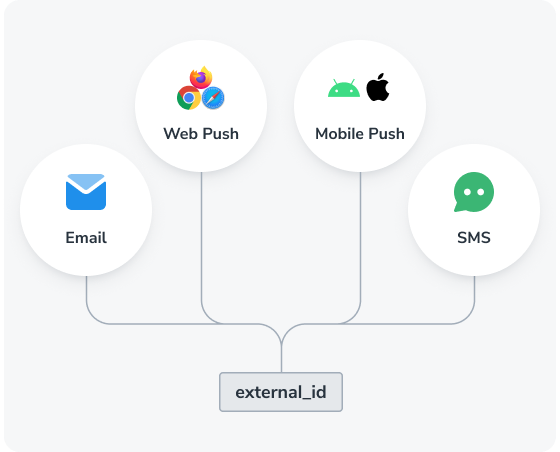
Use the External ID to track the user across their subscriptions.
OneSignal.login(recommended). See Mobile SDK and Web SDK.- Create user API.
- Transfer subscription API.
OneSignal.logout. Removes the External ID and returns the User to anonymous.
Restricted IDs
User lifecycle
OneSignal creates and deletes Users automatically as their Subscriptions and identifiers change. These rules determine what remains after a Subscription is removed.When a User is created
OneSignal creates a User when:- A person opens your app or subscribes to your website for the first time. See OneSignal ID.
- You call the Create user API. A User can be created with only an
identity(such as an External ID); Subscriptions are optional. - You add users via CSV import.
When a User is deleted
OneSignal deletes a User in two ways:- Manually: You delete the User from the dashboard or via the Delete user API. This removes the User with all of their Subscriptions, aliases, and properties. See Delete users.
- Automatically: The User’s last Subscription is deleted and the User has no External ID or Aliases. Nothing can reference such a User anymore, so OneSignal removes the User record and their properties (such as Tags).
OneSignal.login or new Subscription with the same External ID reconnects to the same profile with all properties preserved.
To keep a User’s Tags and other properties after all of their Subscriptions are removed, assign an External ID before deleting the last Subscription.
Multiple users on the same device
When multiple users share a device, each new login should trigger a call toOneSignal.login with a different External ID. This reassigns the OneSignal ID and Subscription to the new user. For the full list of what transfers when the User changes, see What transfers when a User changes in the Overview.
To handle logout, you can do the following to remove the user context:
- Call
OneSignal.logoutto clear the External ID, remove previous User properties (Tags, Aliases, etc.), and assign an anonymous OneSignal ID. - Optionally disable notifications using
optOut, and re-enable withoptInwhen logging back in.
Monthly active users (MAU)
MAU is used for billing and is defined as a mobile Subscription that has at least one session during your billing cycle (see Sessions). This includes:- Users that open your app for the first time, creating a mobile Subscription via our SDK
- Users that reinstall the app and open it again, creating another mobile Subscription via our SDK
- Users that get imported via our API
MAU billing example
If a User has these Subscriptions:- iOS mobile (active in the current billing cycle)
- Android mobile (active in the current billing cycle)
- Web push
- SMS
Reducing MAUs (e.g., paywall use cases)
You can delay SDK initialization and Subscription creation using the mobile SDK privacy methods.- Call
setConsentRequired()before initializing the SDK. This prevents auto-creation of a Subscription. - Call
setConsentGiven()when ready to create a Subscription for the user.
FAQ
What is the difference between a OneSignal ID and an External ID?
The OneSignal ID is a UUID v4 that OneSignal generates automatically for every User. The External ID is a value you assign from your own system (auth, billing, CRM) to identify the same User across devices and channels. The OneSignal ID is OneSignal’s identifier for the User; the External ID is your identifier for the same User.When should I call OneSignal.login?
Call OneSignal.login as soon as you have a stable identifier for the user: at signup, on every login, and on session resume. Calling it late or sporadically breaks attribution between anonymous activity and the authenticated User, and may leave Subscriptions split across multiple OneSignal IDs.
What happens when a user reinstalls the app?
A new OneSignal ID and Subscription are created. CallingOneSignal.login with the same External ID links the new Subscription back to the original User profile, preserving Tags, Aliases, and other User-level properties.
What happens when a user logs out and another logs in on the same device?
CallOneSignal.logout first to clear the previous User context, then OneSignal.login with the new user’s External ID. The Subscription transfers to the new User and inherits their Tags, language, and other properties. The previous User’s properties no longer apply to that Subscription. See Multiple users on the same device.
How many Subscriptions can a User have?
Each User can have up to 20 Subscriptions across all channels (mobile push, web push, email, and SMS).What is the difference between an anonymous and identified User?
An anonymous User has no External ID. Each Subscription is treated as a separate User with its own OneSignal ID. An identified User has an External ID, which causes OneSignal to merge all Subscriptions sharing that External ID under a single User profile.What happens to a User when all of their Subscriptions are deleted?
It depends on whether the User is identified. A User with an External ID or alias is kept with all of their properties and can be reconnected to new Subscriptions later. A User with no External ID and no aliases is deleted automatically along with their properties, because nothing can reference them anymore. See User lifecycle.Does subscription status affect MAU billing?
No. Any mobile Subscription with a session during your billing cycle counts as an MAU, regardless of whether the Subscription is opted in or opted out of notifications.Related pages
Subscriptions
Devices, email addresses, and phone numbers that receive your messages.
Aliases
Map custom identifiers to Users for cross-platform tracking and integrations.
Tags
Add custom properties to users for personalization and segmentation.
Identity verification
Require server-generated JWTs to prevent User impersonation.