

curl --request PATCH \
  --url 'https://api.onesignal.com/templates/{template_id}?app_id={app_id}' \
  --header 'Authorization: <authorization>' \
  --header 'Content-Type: application/json' \
  --data '
{
  "name": "YOUR_TEMPLATE_NAME",
  "isEmail": true,
  "email_body": "<string>",
  "isSMS": true,
  "dynamic_content": {
    "campaign_id": {
      "A": {
        "title": "Custom Title A",
        "message": "Custom Message A",
        "url": "https://www.onesignal.com"
      },
      "B": {
        "title": "Custom Title B",
        "message": "Custom Message B",
        "url": "https://www.onesignal.com/login"
      }
    }
  }
}
'
import Onesignal from '@onesignal/node-onesignal';
const configuration = Onesignal.createConfiguration({
restApiKey: 'YOUR_REST_API_KEY',
});
const apiInstance = new Onesignal.DefaultApi(configuration);
// string
const templateId: string = "e4d3c2b1-a09f-4f1e-8d7c-6b5a4f3e2d1c";
// string
const appId: string = "YOUR_APP_ID";
// UpdateTemplateRequest
const updateTemplateRequest: Onesignal.UpdateTemplateRequest = {
name: "name_example",
contents: {
en: "en_example",
ar: "ar_example",
bs: "bs_example",
bg: "bg_example",
ca: "ca_example",
zh_hans: "zh_hans_example",
zh_hant: "zh_hant_example",
zh: "zh_example",
hr: "hr_example",
cs: "cs_example",
da: "da_example",
nl: "nl_example",
et: "et_example",
fi: "fi_example",
fr: "fr_example",
ka: "ka_example",
de: "de_example",
el: "el_example",
hi: "hi_example",
he: "he_example",
hu: "hu_example",
id: "id_example",
it: "it_example",
ja: "ja_example",
ko: "ko_example",
lv: "lv_example",
lt: "lt_example",
ms: "ms_example",
nb: "nb_example",
pl: "pl_example",
fa: "fa_example",
pt: "pt_example",
pa: "pa_example",
ro: "ro_example",
ru: "ru_example",
sr: "sr_example",
sk: "sk_example",
es: "es_example",
sv: "sv_example",
th: "th_example",
tr: "tr_example",
uk: "uk_example",
vi: "vi_example",
},
headings: {
en: "en_example",
ar: "ar_example",
bs: "bs_example",
bg: "bg_example",
ca: "ca_example",
zh_hans: "zh_hans_example",
zh_hant: "zh_hant_example",
zh: "zh_example",
hr: "hr_example",
cs: "cs_example",
da: "da_example",
nl: "nl_example",
et: "et_example",
fi: "fi_example",
fr: "fr_example",
ka: "ka_example",
de: "de_example",
el: "el_example",
hi: "hi_example",
he: "he_example",
hu: "hu_example",
id: "id_example",
it: "it_example",
ja: "ja_example",
ko: "ko_example",
lv: "lv_example",
lt: "lt_example",
ms: "ms_example",
nb: "nb_example",
pl: "pl_example",
fa: "fa_example",
pt: "pt_example",
pa: "pa_example",
ro: "ro_example",
ru: "ru_example",
sr: "sr_example",
sk: "sk_example",
es: "es_example",
sv: "sv_example",
th: "th_example",
tr: "tr_example",
uk: "uk_example",
vi: "vi_example",
},
subtitle: {
en: "en_example",
ar: "ar_example",
bs: "bs_example",
bg: "bg_example",
ca: "ca_example",
zh_hans: "zh_hans_example",
zh_hant: "zh_hant_example",
zh: "zh_example",
hr: "hr_example",
cs: "cs_example",
da: "da_example",
nl: "nl_example",
et: "et_example",
fi: "fi_example",
fr: "fr_example",
ka: "ka_example",
de: "de_example",
el: "el_example",
hi: "hi_example",
he: "he_example",
hu: "hu_example",
id: "id_example",
it: "it_example",
ja: "ja_example",
ko: "ko_example",
lv: "lv_example",
lt: "lt_example",
ms: "ms_example",
nb: "nb_example",
pl: "pl_example",
fa: "fa_example",
pt: "pt_example",
pa: "pa_example",
ro: "ro_example",
ru: "ru_example",
sr: "sr_example",
sk: "sk_example",
es: "es_example",
sv: "sv_example",
th: "th_example",
tr: "tr_example",
uk: "uk_example",
vi: "vi_example",
},
is_email: true,
email_subject: "email_subject_example",
email_body: "email_body_example",
email_bcc: [
"email_bcc_example",
],
is_sms: true,
dynamic_content: "dynamic_content_example",
};
try {
const response = await apiInstance.updateTemplate(templateId, appId, updateTemplateRequest);
console.log(response);
} catch (e) {
if (e instanceof Onesignal.ApiException) {
// `e.errorMessages` flattens any error-envelope shape to a `string[]`;
// the raw parsed body remains on `e.body`.
console.error("updateTemplate failed: HTTP " + e.code, e.errorMessages);
} else {
throw e;
}
}import onesignal
from onesignal.api import default_api
from onesignal.models import *
from pprint import pprint
# See configuration.py for a list of all supported configuration parameters.
# Some of the OneSignal endpoints require ORGANIZATION_API_KEY token for authorization, while others require REST_API_KEY.
# We recommend adding both of them in the configuration page so that you will not need to figure it out yourself.
configuration = onesignal.Configuration(
rest_api_key = "YOUR_REST_API_KEY", # App REST API key required for most endpoints
organization_api_key = "YOUR_ORGANIZATION_API_KEY" # Organization key is only required for creating new apps and other top-level endpoints
)
# Enter a context with an instance of the API client
with onesignal.ApiClient(configuration) as api_client:
# Create an instance of the API class
api_instance = default_api.DefaultApi(api_client)
template_id = "e4d3c2b1-a09f-4f1e-8d7c-6b5a4f3e2d1c"
app_id = "YOUR_APP_ID"
update_template_request = UpdateTemplateRequest(
name="name_example",
contents=LanguageStringMap(
en="en_example",
ar="ar_example",
bs="bs_example",
bg="bg_example",
ca="ca_example",
zh_hans="zh_hans_example",
zh_hant="zh_hant_example",
zh="zh_example",
hr="hr_example",
cs="cs_example",
da="da_example",
nl="nl_example",
et="et_example",
fi="fi_example",
fr="fr_example",
ka="ka_example",
de="de_example",
el="el_example",
hi="hi_example",
he="he_example",
hu="hu_example",
id="id_example",
it="it_example",
ja="ja_example",
ko="ko_example",
lv="lv_example",
lt="lt_example",
ms="ms_example",
nb="nb_example",
pl="pl_example",
fa="fa_example",
pt="pt_example",
pa="pa_example",
ro="ro_example",
ru="ru_example",
sr="sr_example",
sk="sk_example",
es="es_example",
sv="sv_example",
th="th_example",
tr="tr_example",
uk="uk_example",
vi="vi_example",
),
headings=LanguageStringMap(
en="en_example",
ar="ar_example",
bs="bs_example",
bg="bg_example",
ca="ca_example",
zh_hans="zh_hans_example",
zh_hant="zh_hant_example",
zh="zh_example",
hr="hr_example",
cs="cs_example",
da="da_example",
nl="nl_example",
et="et_example",
fi="fi_example",
fr="fr_example",
ka="ka_example",
de="de_example",
el="el_example",
hi="hi_example",
he="he_example",
hu="hu_example",
id="id_example",
it="it_example",
ja="ja_example",
ko="ko_example",
lv="lv_example",
lt="lt_example",
ms="ms_example",
nb="nb_example",
pl="pl_example",
fa="fa_example",
pt="pt_example",
pa="pa_example",
ro="ro_example",
ru="ru_example",
sr="sr_example",
sk="sk_example",
es="es_example",
sv="sv_example",
th="th_example",
tr="tr_example",
uk="uk_example",
vi="vi_example",
),
subtitle=LanguageStringMap(
en="en_example",
ar="ar_example",
bs="bs_example",
bg="bg_example",
ca="ca_example",
zh_hans="zh_hans_example",
zh_hant="zh_hant_example",
zh="zh_example",
hr="hr_example",
cs="cs_example",
da="da_example",
nl="nl_example",
et="et_example",
fi="fi_example",
fr="fr_example",
ka="ka_example",
de="de_example",
el="el_example",
hi="hi_example",
he="he_example",
hu="hu_example",
id="id_example",
it="it_example",
ja="ja_example",
ko="ko_example",
lv="lv_example",
lt="lt_example",
ms="ms_example",
nb="nb_example",
pl="pl_example",
fa="fa_example",
pt="pt_example",
pa="pa_example",
ro="ro_example",
ru="ru_example",
sr="sr_example",
sk="sk_example",
es="es_example",
sv="sv_example",
th="th_example",
tr="tr_example",
uk="uk_example",
vi="vi_example",
),
is_email=True,
email_subject="email_subject_example",
email_body="email_body_example",
email_bcc=[
"email_bcc_example",
],
is_sms=True,
dynamic_content="dynamic_content_example",
)
try:
# Update template
api_response = api_instance.update_template(template_id, app_id, update_template_request)
pprint(api_response)
except onesignal.ApiException as e:
print("Exception when calling DefaultApi->update_template: %s\n" % e)
print("Status Code: %s" % e.status)
print("Response Body: %s" % e.body)<?php
require_once(__DIR__ . '/vendor/autoload.php');
// Configure Bearer authorization: rest_api_key
$config = onesignal\client\Configuration::getDefaultConfiguration()
->setRestApiKeyToken('YOUR_REST_API_KEY')
->setOrganizationApiKeyToken('YOUR_ORGANIZATION_API_KEY');
$apiInstance = new onesignal\client\Api\DefaultApi(
// If you want use custom http client, pass your client which implements `GuzzleHttp\ClientInterface`.
// This is optional, `GuzzleHttp\Client` will be used as default.
new GuzzleHttp\Client(),
$config
);
$template_id = 'e4d3c2b1-a09f-4f1e-8d7c-6b5a4f3e2d1c'; // string
$app_id = 'YOUR_APP_ID'; // string
$update_template_request = new \onesignal\client\model\UpdateTemplateRequest(); // \onesignal\client\model\UpdateTemplateRequest
try {
$result = $apiInstance->updateTemplate($template_id, $app_id, $update_template_request);
print_r($result);
} catch (\onesignal\client\ApiException $e) {
echo 'Exception when calling DefaultApi->updateTemplate: ', $e->getMessage(), PHP_EOL;
echo 'Status Code: ', $e->getCode(), PHP_EOL;
// getErrorMessages() flattens any error-envelope shape to a string[];
// the raw body remains on getResponseBody().
echo 'Error Messages: ', implode(', ', $e->getErrorMessages()), PHP_EOL;
echo 'Response Body: ', $e->getResponseBody(), PHP_EOL;
} catch (\Exception $e) {
echo 'Exception when calling DefaultApi->updateTemplate: ', $e->getMessage(), PHP_EOL;
}package main
import (
"context"
"fmt"
"os"
"github.com/OneSignal/onesignal-go-api/v5"
)
func main() {
templateId := "e4d3c2b1-a09f-4f1e-8d7c-6b5a4f3e2d1c" // string |
appId := "YOUR_APP_ID" // string |
updateTemplateRequest := *onesignal.NewUpdateTemplateRequest() // UpdateTemplateRequest |
configuration := onesignal.NewConfiguration()
apiClient := onesignal.NewAPIClient(configuration)
restAuth := context.WithValue(context.Background(), onesignal.RestApiKey, "YOUR_REST_API_KEY") // App REST API key required for most endpoints
resp, r, err := apiClient.DefaultApi.UpdateTemplate(restAuth, templateId).AppId(appId).UpdateTemplateRequest(updateTemplateRequest).Execute()
if err != nil {
fmt.Fprintf(os.Stderr, "Error when calling `DefaultApi.UpdateTemplate``: %v\n", err)
fmt.Fprintf(os.Stderr, "Full HTTP response: %v\n", r)
if apiErr, ok := err.(*onesignal.GenericOpenAPIError); ok {
// ErrorMessages() flattens any error-envelope shape to a []string;
// the raw body remains on Body().
fmt.Fprintf(os.Stderr, "Error Messages: %v\n", apiErr.ErrorMessages())
fmt.Fprintf(os.Stderr, "Response Body: %s\n", apiErr.Body())
}
}
// response from `UpdateTemplate`: TemplateResource
fmt.Fprintf(os.Stdout, "Response from `DefaultApi.UpdateTemplate`: %v\n", resp)
}require 'onesignal'
# setup authorization
OneSignal.configure do |config|
# Configure Bearer authorization: rest_api_key
config.rest_api_key = 'YOUR_REST_API_KEY'
end
api_instance = OneSignal::DefaultApi.new
template_id = 'e4d3c2b1-a09f-4f1e-8d7c-6b5a4f3e2d1c' # String |
app_id = 'YOUR_APP_ID' # String |
update_template_request = OneSignal::UpdateTemplateRequest.new # UpdateTemplateRequest |
begin
# Update template
result = api_instance.update_template(template_id, app_id, update_template_request)
p result
rescue OneSignal::ApiError => e
puts "Error when calling DefaultApi->update_template: #{e}"
puts "Status Code: #{e.code}"
# `e.error_messages` flattens any error-envelope shape to an Array<String>;
# the raw body remains on `e.response_body`.
puts "Error Messages: #{e.error_messages}"
puts "Response Body: #{e.response_body}"
end// Import classes:
import com.onesignal.client.ApiClient;
import com.onesignal.client.ApiException;
import com.onesignal.client.Configuration;
import com.onesignal.client.auth.*;
import com.onesignal.client.model.*;
import com.onesignal.client.api.DefaultApi;
public class Example {
public static void main(String[] args) {
ApiClient defaultClient = Configuration.getDefaultApiClient();
defaultClient.setBasePath("https://api.onesignal.com");
// Configure HTTP bearer authorization: rest_api_key
HttpBearerAuth rest_api_key = (HttpBearerAuth) defaultClient.getAuthentication("rest_api_key");
rest_api_key.setBearerToken("YOUR_REST_API_KEY");
DefaultApi apiInstance = new DefaultApi(defaultClient);
String templateId = "e4d3c2b1-a09f-4f1e-8d7c-6b5a4f3e2d1c"; // String |
String appId = "YOUR_APP_ID"; // String |
UpdateTemplateRequest updateTemplateRequest = new UpdateTemplateRequest(); // UpdateTemplateRequest |
try {
TemplateResource result = apiInstance.updateTemplate(templateId, appId, updateTemplateRequest);
System.out.println(result);
} catch (ApiException e) {
System.err.println("Exception when calling DefaultApi#updateTemplate");
System.err.println("Status code: " + e.getCode());
// getErrorMessages() flattens any error-envelope shape to a List<String>;
// the raw body remains on getResponseBody().
System.err.println("Error messages: " + e.getErrorMessages());
System.err.println("Reason: " + e.getResponseBody());
System.err.println("Response headers: " + e.getResponseHeaders());
e.printStackTrace();
}
}
}using System;
using System.Collections.Generic;
using System.Diagnostics;
using OneSignalApi.Api;
using OneSignalApi.Client;
using OneSignalApi.Model;
namespace Example
{
public class UpdateTemplateExample
{
public static void Main()
{
Configuration config = new Configuration();
config.BasePath = "https://api.onesignal.com";
// Configure Bearer token for authorization: rest_api_key
config.AccessToken = "YOUR_REST_API_KEY";
var apiInstance = new DefaultApi(config);
var templateId = "e4d3c2b1-a09f-4f1e-8d7c-6b5a4f3e2d1c"; // string |
var appId = "YOUR_APP_ID"; // string |
var updateTemplateRequest = new UpdateTemplateRequest(); // UpdateTemplateRequest |
try
{
// Update template
TemplateResource result = apiInstance.UpdateTemplate(templateId, appId, updateTemplateRequest);
Debug.WriteLine(result);
}
catch (ApiException e)
{
Debug.Print("Exception when calling DefaultApi.UpdateTemplate: " + e.Message );
Debug.Print("Status Code: "+ e.ErrorCode);
// e.ErrorMessages flattens any error-envelope shape to an IReadOnlyList<string>;
// the raw body remains on e.ErrorContent.
Debug.Print("Error Messages: " + string.Join(", ", e.ErrorMessages));
Debug.Print("Response Body: " + e.ErrorContent);
Debug.Print(e.StackTrace);
}
}
}
}use onesignal_rust_api::apis::configuration::Configuration;
use onesignal_rust_api::apis::default_api;
use onesignal_rust_api::models;
#[tokio::main]
async fn main() {
let mut configuration = Configuration::new();
configuration.rest_api_key_token = Some("YOUR_REST_API_KEY".to_string());
// Realistic values are pulled from the spec's `example:` fields where present.
let template_id: &str = "e4d3c2b1-a09f-4f1e-8d7c-6b5a4f3e2d1c";
let app_id: &str = "YOUR_APP_ID";
let update_template_request: models::UpdateTemplateRequest = todo!();
match default_api::update_template(&configuration, template_id, app_id, update_template_request).await {
Ok(resp) => println!("{:?}", resp),
Err(e @ onesignal_rust_api::apis::Error::ResponseError(_)) => {
// `e.error_messages()` flattens any error-envelope shape to a Vec<String>;
// the raw response remains on the ResponseError variant.
eprintln!("update_template failed: {:?}", e.error_messages());
}
Err(e) => eprintln!("update_template failed: {:?}", e),
}
}{
"id": "3c90c3cc-0d44-4b50-8888-8dd25736052a",
"name": "<string>",
"channel": "push",
"created_at": "2023-11-07T05:31:56Z",
"updated_at": "2023-11-07T05:31:56Z",
"content": {
"isAndroid": true,
"isIos": true,
"isMacOSX": true,
"isAdm": true,
"isAlexa": true,
"isWP": true,
"isWP_WNS": true,
"isChrome": true,
"isChromeWeb": true,
"isSafari": true,
"isFirefox": true,
"isEdge": true,
"isHuawei": true,
"headings": {},
"subtitle": {},
"contents": {},
"global_image": "<string>",
"url": "<string>",
"isEmail": true,
"email_body": "<string>",
"email_subject": "<string>",
"email_preheader": "<string>",
"email_from_address": "jsmith@example.com",
"email_from_name": "<string>",
"email_reply_to_address": "jsmith@example.com",
"email_bcc": [
"jsmith@example.com"
],
"disable_email_click_tracking": true,
"isSMS": true,
"sms_from": "<string>",
"sms_media_urls": [
"<string>"
],
"huawei_badge_add_num": 123,
"huawei_badge_class": "<string>",
"huawei_badge_set_num": 123
}
}{
"success": false,
"errors": [
"'message' Notifications must have Any/English language content"
]
}{
"errors": [
"API rate limit exceeded"
]
}{
"errors": [
"Service temporarily unavailable"
]
}Update template
Update existing OneSignal message templates for push, email, or SMS. Changes apply immediately across dashboard and API usage via the template_id reference.
curl --request PATCH \
  --url 'https://api.onesignal.com/templates/{template_id}?app_id={app_id}' \
  --header 'Authorization: <authorization>' \
  --header 'Content-Type: application/json' \
  --data '
{
  "name": "YOUR_TEMPLATE_NAME",
  "isEmail": true,
  "email_body": "<string>",
  "isSMS": true,
  "dynamic_content": {
    "campaign_id": {
      "A": {
        "title": "Custom Title A",
        "message": "Custom Message A",
        "url": "https://www.onesignal.com"
      },
      "B": {
        "title": "Custom Title B",
        "message": "Custom Message B",
        "url": "https://www.onesignal.com/login"
      }
    }
  }
}
'
import Onesignal from '@onesignal/node-onesignal';
const configuration = Onesignal.createConfiguration({
restApiKey: 'YOUR_REST_API_KEY',
});
const apiInstance = new Onesignal.DefaultApi(configuration);
// string
const templateId: string = "e4d3c2b1-a09f-4f1e-8d7c-6b5a4f3e2d1c";
// string
const appId: string = "YOUR_APP_ID";
// UpdateTemplateRequest
const updateTemplateRequest: Onesignal.UpdateTemplateRequest = {
name: "name_example",
contents: {
en: "en_example",
ar: "ar_example",
bs: "bs_example",
bg: "bg_example",
ca: "ca_example",
zh_hans: "zh_hans_example",
zh_hant: "zh_hant_example",
zh: "zh_example",
hr: "hr_example",
cs: "cs_example",
da: "da_example",
nl: "nl_example",
et: "et_example",
fi: "fi_example",
fr: "fr_example",
ka: "ka_example",
de: "de_example",
el: "el_example",
hi: "hi_example",
he: "he_example",
hu: "hu_example",
id: "id_example",
it: "it_example",
ja: "ja_example",
ko: "ko_example",
lv: "lv_example",
lt: "lt_example",
ms: "ms_example",
nb: "nb_example",
pl: "pl_example",
fa: "fa_example",
pt: "pt_example",
pa: "pa_example",
ro: "ro_example",
ru: "ru_example",
sr: "sr_example",
sk: "sk_example",
es: "es_example",
sv: "sv_example",
th: "th_example",
tr: "tr_example",
uk: "uk_example",
vi: "vi_example",
},
headings: {
en: "en_example",
ar: "ar_example",
bs: "bs_example",
bg: "bg_example",
ca: "ca_example",
zh_hans: "zh_hans_example",
zh_hant: "zh_hant_example",
zh: "zh_example",
hr: "hr_example",
cs: "cs_example",
da: "da_example",
nl: "nl_example",
et: "et_example",
fi: "fi_example",
fr: "fr_example",
ka: "ka_example",
de: "de_example",
el: "el_example",
hi: "hi_example",
he: "he_example",
hu: "hu_example",
id: "id_example",
it: "it_example",
ja: "ja_example",
ko: "ko_example",
lv: "lv_example",
lt: "lt_example",
ms: "ms_example",
nb: "nb_example",
pl: "pl_example",
fa: "fa_example",
pt: "pt_example",
pa: "pa_example",
ro: "ro_example",
ru: "ru_example",
sr: "sr_example",
sk: "sk_example",
es: "es_example",
sv: "sv_example",
th: "th_example",
tr: "tr_example",
uk: "uk_example",
vi: "vi_example",
},
subtitle: {
en: "en_example",
ar: "ar_example",
bs: "bs_example",
bg: "bg_example",
ca: "ca_example",
zh_hans: "zh_hans_example",
zh_hant: "zh_hant_example",
zh: "zh_example",
hr: "hr_example",
cs: "cs_example",
da: "da_example",
nl: "nl_example",
et: "et_example",
fi: "fi_example",
fr: "fr_example",
ka: "ka_example",
de: "de_example",
el: "el_example",
hi: "hi_example",
he: "he_example",
hu: "hu_example",
id: "id_example",
it: "it_example",
ja: "ja_example",
ko: "ko_example",
lv: "lv_example",
lt: "lt_example",
ms: "ms_example",
nb: "nb_example",
pl: "pl_example",
fa: "fa_example",
pt: "pt_example",
pa: "pa_example",
ro: "ro_example",
ru: "ru_example",
sr: "sr_example",
sk: "sk_example",
es: "es_example",
sv: "sv_example",
th: "th_example",
tr: "tr_example",
uk: "uk_example",
vi: "vi_example",
},
is_email: true,
email_subject: "email_subject_example",
email_body: "email_body_example",
email_bcc: [
"email_bcc_example",
],
is_sms: true,
dynamic_content: "dynamic_content_example",
};
try {
const response = await apiInstance.updateTemplate(templateId, appId, updateTemplateRequest);
console.log(response);
} catch (e) {
if (e instanceof Onesignal.ApiException) {
// `e.errorMessages` flattens any error-envelope shape to a `string[]`;
// the raw parsed body remains on `e.body`.
console.error("updateTemplate failed: HTTP " + e.code, e.errorMessages);
} else {
throw e;
}
}import onesignal
from onesignal.api import default_api
from onesignal.models import *
from pprint import pprint
# See configuration.py for a list of all supported configuration parameters.
# Some of the OneSignal endpoints require ORGANIZATION_API_KEY token for authorization, while others require REST_API_KEY.
# We recommend adding both of them in the configuration page so that you will not need to figure it out yourself.
configuration = onesignal.Configuration(
rest_api_key = "YOUR_REST_API_KEY", # App REST API key required for most endpoints
organization_api_key = "YOUR_ORGANIZATION_API_KEY" # Organization key is only required for creating new apps and other top-level endpoints
)
# Enter a context with an instance of the API client
with onesignal.ApiClient(configuration) as api_client:
# Create an instance of the API class
api_instance = default_api.DefaultApi(api_client)
template_id = "e4d3c2b1-a09f-4f1e-8d7c-6b5a4f3e2d1c"
app_id = "YOUR_APP_ID"
update_template_request = UpdateTemplateRequest(
name="name_example",
contents=LanguageStringMap(
en="en_example",
ar="ar_example",
bs="bs_example",
bg="bg_example",
ca="ca_example",
zh_hans="zh_hans_example",
zh_hant="zh_hant_example",
zh="zh_example",
hr="hr_example",
cs="cs_example",
da="da_example",
nl="nl_example",
et="et_example",
fi="fi_example",
fr="fr_example",
ka="ka_example",
de="de_example",
el="el_example",
hi="hi_example",
he="he_example",
hu="hu_example",
id="id_example",
it="it_example",
ja="ja_example",
ko="ko_example",
lv="lv_example",
lt="lt_example",
ms="ms_example",
nb="nb_example",
pl="pl_example",
fa="fa_example",
pt="pt_example",
pa="pa_example",
ro="ro_example",
ru="ru_example",
sr="sr_example",
sk="sk_example",
es="es_example",
sv="sv_example",
th="th_example",
tr="tr_example",
uk="uk_example",
vi="vi_example",
),
headings=LanguageStringMap(
en="en_example",
ar="ar_example",
bs="bs_example",
bg="bg_example",
ca="ca_example",
zh_hans="zh_hans_example",
zh_hant="zh_hant_example",
zh="zh_example",
hr="hr_example",
cs="cs_example",
da="da_example",
nl="nl_example",
et="et_example",
fi="fi_example",
fr="fr_example",
ka="ka_example",
de="de_example",
el="el_example",
hi="hi_example",
he="he_example",
hu="hu_example",
id="id_example",
it="it_example",
ja="ja_example",
ko="ko_example",
lv="lv_example",
lt="lt_example",
ms="ms_example",
nb="nb_example",
pl="pl_example",
fa="fa_example",
pt="pt_example",
pa="pa_example",
ro="ro_example",
ru="ru_example",
sr="sr_example",
sk="sk_example",
es="es_example",
sv="sv_example",
th="th_example",
tr="tr_example",
uk="uk_example",
vi="vi_example",
),
subtitle=LanguageStringMap(
en="en_example",
ar="ar_example",
bs="bs_example",
bg="bg_example",
ca="ca_example",
zh_hans="zh_hans_example",
zh_hant="zh_hant_example",
zh="zh_example",
hr="hr_example",
cs="cs_example",
da="da_example",
nl="nl_example",
et="et_example",
fi="fi_example",
fr="fr_example",
ka="ka_example",
de="de_example",
el="el_example",
hi="hi_example",
he="he_example",
hu="hu_example",
id="id_example",
it="it_example",
ja="ja_example",
ko="ko_example",
lv="lv_example",
lt="lt_example",
ms="ms_example",
nb="nb_example",
pl="pl_example",
fa="fa_example",
pt="pt_example",
pa="pa_example",
ro="ro_example",
ru="ru_example",
sr="sr_example",
sk="sk_example",
es="es_example",
sv="sv_example",
th="th_example",
tr="tr_example",
uk="uk_example",
vi="vi_example",
),
is_email=True,
email_subject="email_subject_example",
email_body="email_body_example",
email_bcc=[
"email_bcc_example",
],
is_sms=True,
dynamic_content="dynamic_content_example",
)
try:
# Update template
api_response = api_instance.update_template(template_id, app_id, update_template_request)
pprint(api_response)
except onesignal.ApiException as e:
print("Exception when calling DefaultApi->update_template: %s\n" % e)
print("Status Code: %s" % e.status)
print("Response Body: %s" % e.body)<?php
require_once(__DIR__ . '/vendor/autoload.php');
// Configure Bearer authorization: rest_api_key
$config = onesignal\client\Configuration::getDefaultConfiguration()
->setRestApiKeyToken('YOUR_REST_API_KEY')
->setOrganizationApiKeyToken('YOUR_ORGANIZATION_API_KEY');
$apiInstance = new onesignal\client\Api\DefaultApi(
// If you want use custom http client, pass your client which implements `GuzzleHttp\ClientInterface`.
// This is optional, `GuzzleHttp\Client` will be used as default.
new GuzzleHttp\Client(),
$config
);
$template_id = 'e4d3c2b1-a09f-4f1e-8d7c-6b5a4f3e2d1c'; // string
$app_id = 'YOUR_APP_ID'; // string
$update_template_request = new \onesignal\client\model\UpdateTemplateRequest(); // \onesignal\client\model\UpdateTemplateRequest
try {
$result = $apiInstance->updateTemplate($template_id, $app_id, $update_template_request);
print_r($result);
} catch (\onesignal\client\ApiException $e) {
echo 'Exception when calling DefaultApi->updateTemplate: ', $e->getMessage(), PHP_EOL;
echo 'Status Code: ', $e->getCode(), PHP_EOL;
// getErrorMessages() flattens any error-envelope shape to a string[];
// the raw body remains on getResponseBody().
echo 'Error Messages: ', implode(', ', $e->getErrorMessages()), PHP_EOL;
echo 'Response Body: ', $e->getResponseBody(), PHP_EOL;
} catch (\Exception $e) {
echo 'Exception when calling DefaultApi->updateTemplate: ', $e->getMessage(), PHP_EOL;
}package main
import (
"context"
"fmt"
"os"
"github.com/OneSignal/onesignal-go-api/v5"
)
func main() {
templateId := "e4d3c2b1-a09f-4f1e-8d7c-6b5a4f3e2d1c" // string |
appId := "YOUR_APP_ID" // string |
updateTemplateRequest := *onesignal.NewUpdateTemplateRequest() // UpdateTemplateRequest |
configuration := onesignal.NewConfiguration()
apiClient := onesignal.NewAPIClient(configuration)
restAuth := context.WithValue(context.Background(), onesignal.RestApiKey, "YOUR_REST_API_KEY") // App REST API key required for most endpoints
resp, r, err := apiClient.DefaultApi.UpdateTemplate(restAuth, templateId).AppId(appId).UpdateTemplateRequest(updateTemplateRequest).Execute()
if err != nil {
fmt.Fprintf(os.Stderr, "Error when calling `DefaultApi.UpdateTemplate``: %v\n", err)
fmt.Fprintf(os.Stderr, "Full HTTP response: %v\n", r)
if apiErr, ok := err.(*onesignal.GenericOpenAPIError); ok {
// ErrorMessages() flattens any error-envelope shape to a []string;
// the raw body remains on Body().
fmt.Fprintf(os.Stderr, "Error Messages: %v\n", apiErr.ErrorMessages())
fmt.Fprintf(os.Stderr, "Response Body: %s\n", apiErr.Body())
}
}
// response from `UpdateTemplate`: TemplateResource
fmt.Fprintf(os.Stdout, "Response from `DefaultApi.UpdateTemplate`: %v\n", resp)
}require 'onesignal'
# setup authorization
OneSignal.configure do |config|
# Configure Bearer authorization: rest_api_key
config.rest_api_key = 'YOUR_REST_API_KEY'
end
api_instance = OneSignal::DefaultApi.new
template_id = 'e4d3c2b1-a09f-4f1e-8d7c-6b5a4f3e2d1c' # String |
app_id = 'YOUR_APP_ID' # String |
update_template_request = OneSignal::UpdateTemplateRequest.new # UpdateTemplateRequest |
begin
# Update template
result = api_instance.update_template(template_id, app_id, update_template_request)
p result
rescue OneSignal::ApiError => e
puts "Error when calling DefaultApi->update_template: #{e}"
puts "Status Code: #{e.code}"
# `e.error_messages` flattens any error-envelope shape to an Array<String>;
# the raw body remains on `e.response_body`.
puts "Error Messages: #{e.error_messages}"
puts "Response Body: #{e.response_body}"
end// Import classes:
import com.onesignal.client.ApiClient;
import com.onesignal.client.ApiException;
import com.onesignal.client.Configuration;
import com.onesignal.client.auth.*;
import com.onesignal.client.model.*;
import com.onesignal.client.api.DefaultApi;
public class Example {
public static void main(String[] args) {
ApiClient defaultClient = Configuration.getDefaultApiClient();
defaultClient.setBasePath("https://api.onesignal.com");
// Configure HTTP bearer authorization: rest_api_key
HttpBearerAuth rest_api_key = (HttpBearerAuth) defaultClient.getAuthentication("rest_api_key");
rest_api_key.setBearerToken("YOUR_REST_API_KEY");
DefaultApi apiInstance = new DefaultApi(defaultClient);
String templateId = "e4d3c2b1-a09f-4f1e-8d7c-6b5a4f3e2d1c"; // String |
String appId = "YOUR_APP_ID"; // String |
UpdateTemplateRequest updateTemplateRequest = new UpdateTemplateRequest(); // UpdateTemplateRequest |
try {
TemplateResource result = apiInstance.updateTemplate(templateId, appId, updateTemplateRequest);
System.out.println(result);
} catch (ApiException e) {
System.err.println("Exception when calling DefaultApi#updateTemplate");
System.err.println("Status code: " + e.getCode());
// getErrorMessages() flattens any error-envelope shape to a List<String>;
// the raw body remains on getResponseBody().
System.err.println("Error messages: " + e.getErrorMessages());
System.err.println("Reason: " + e.getResponseBody());
System.err.println("Response headers: " + e.getResponseHeaders());
e.printStackTrace();
}
}
}using System;
using System.Collections.Generic;
using System.Diagnostics;
using OneSignalApi.Api;
using OneSignalApi.Client;
using OneSignalApi.Model;
namespace Example
{
public class UpdateTemplateExample
{
public static void Main()
{
Configuration config = new Configuration();
config.BasePath = "https://api.onesignal.com";
// Configure Bearer token for authorization: rest_api_key
config.AccessToken = "YOUR_REST_API_KEY";
var apiInstance = new DefaultApi(config);
var templateId = "e4d3c2b1-a09f-4f1e-8d7c-6b5a4f3e2d1c"; // string |
var appId = "YOUR_APP_ID"; // string |
var updateTemplateRequest = new UpdateTemplateRequest(); // UpdateTemplateRequest |
try
{
// Update template
TemplateResource result = apiInstance.UpdateTemplate(templateId, appId, updateTemplateRequest);
Debug.WriteLine(result);
}
catch (ApiException e)
{
Debug.Print("Exception when calling DefaultApi.UpdateTemplate: " + e.Message );
Debug.Print("Status Code: "+ e.ErrorCode);
// e.ErrorMessages flattens any error-envelope shape to an IReadOnlyList<string>;
// the raw body remains on e.ErrorContent.
Debug.Print("Error Messages: " + string.Join(", ", e.ErrorMessages));
Debug.Print("Response Body: " + e.ErrorContent);
Debug.Print(e.StackTrace);
}
}
}
}use onesignal_rust_api::apis::configuration::Configuration;
use onesignal_rust_api::apis::default_api;
use onesignal_rust_api::models;
#[tokio::main]
async fn main() {
let mut configuration = Configuration::new();
configuration.rest_api_key_token = Some("YOUR_REST_API_KEY".to_string());
// Realistic values are pulled from the spec's `example:` fields where present.
let template_id: &str = "e4d3c2b1-a09f-4f1e-8d7c-6b5a4f3e2d1c";
let app_id: &str = "YOUR_APP_ID";
let update_template_request: models::UpdateTemplateRequest = todo!();
match default_api::update_template(&configuration, template_id, app_id, update_template_request).await {
Ok(resp) => println!("{:?}", resp),
Err(e @ onesignal_rust_api::apis::Error::ResponseError(_)) => {
// `e.error_messages()` flattens any error-envelope shape to a Vec<String>;
// the raw response remains on the ResponseError variant.
eprintln!("update_template failed: {:?}", e.error_messages());
}
Err(e) => eprintln!("update_template failed: {:?}", e),
}
}{
"id": "3c90c3cc-0d44-4b50-8888-8dd25736052a",
"name": "<string>",
"channel": "push",
"created_at": "2023-11-07T05:31:56Z",
"updated_at": "2023-11-07T05:31:56Z",
"content": {
"isAndroid": true,
"isIos": true,
"isMacOSX": true,
"isAdm": true,
"isAlexa": true,
"isWP": true,
"isWP_WNS": true,
"isChrome": true,
"isChromeWeb": true,
"isSafari": true,
"isFirefox": true,
"isEdge": true,
"isHuawei": true,
"headings": {},
"subtitle": {},
"contents": {},
"global_image": "<string>",
"url": "<string>",
"isEmail": true,
"email_body": "<string>",
"email_subject": "<string>",
"email_preheader": "<string>",
"email_from_address": "jsmith@example.com",
"email_from_name": "<string>",
"email_reply_to_address": "jsmith@example.com",
"email_bcc": [
"jsmith@example.com"
],
"disable_email_click_tracking": true,
"isSMS": true,
"sms_from": "<string>",
"sms_media_urls": [
"<string>"
],
"huawei_badge_add_num": 123,
"huawei_badge_class": "<string>",
"huawei_badge_set_num": 123
}
}{
"success": false,
"errors": [
"'message' Notifications must have Any/English language content"
]
}{
"errors": [
"API rate limit exceeded"
]
}{
"errors": [
"Service temporarily unavailable"
]
}Overview
This endpoint allows you to update an existing push, email, or SMS template in your OneSignal app. Once updated, the changes are applied immediately and reflected across both the Dashboard and API when using the associatedtemplate_id.
Templates are updated using the same structure as when creating templates.
How to use this API
To update a template, you must supply:- Your OneSignal App ID found in Keys & IDs.
- The Template ID
Template ID
Each template has a unique OneSignal-generatedtemplate_id (UUID v4). You can find it:
- Using the View Templates API
- In the OneSignal Dashboard under Messages > Templates > Options > Copy Template ID
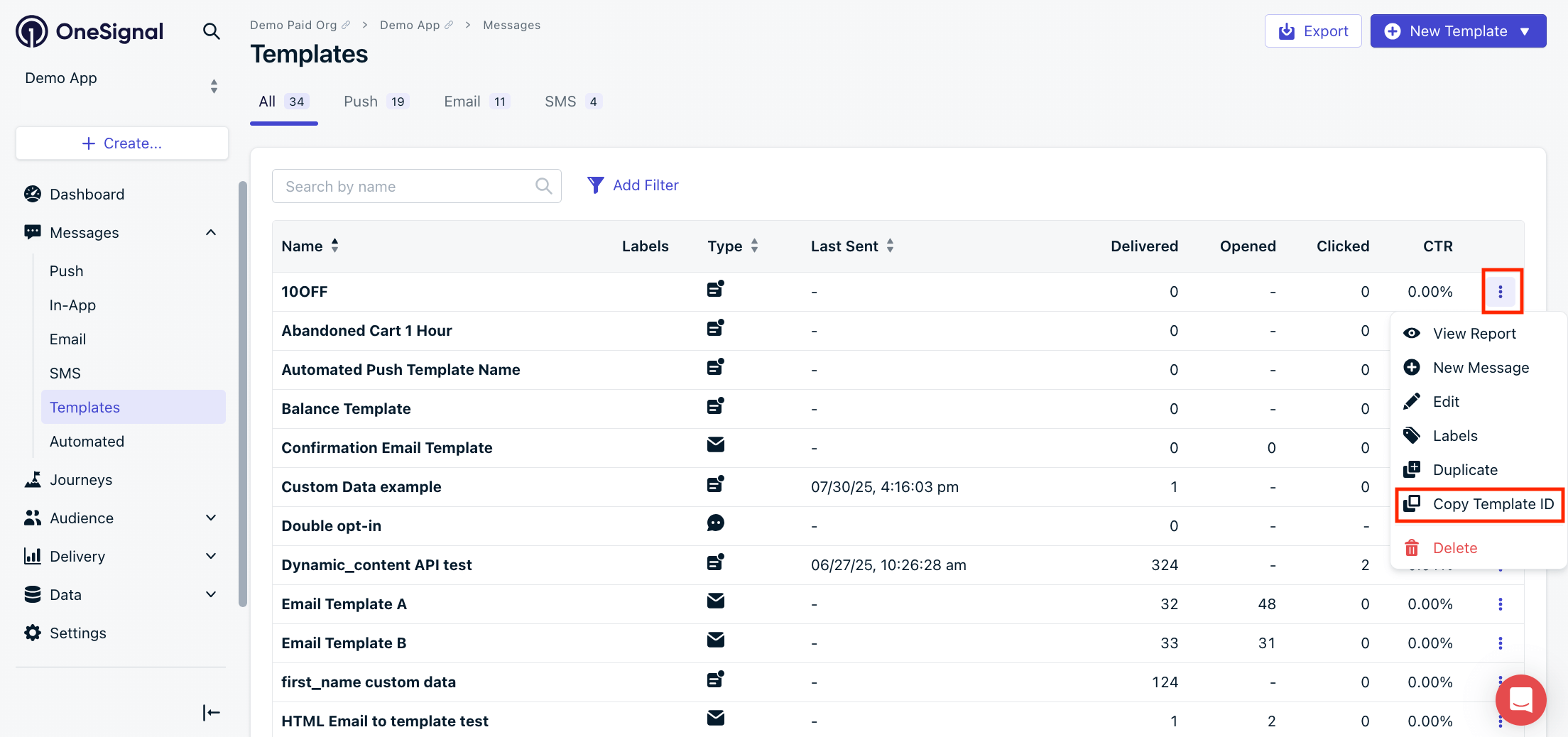
Copy Template ID
Channel-Specific Requirements
Push Templates
- The
contentsproperty must use theen(English) key along with other languages you want to support. - All Push Notification Properties are valid.
- All platforms are enabled by default. To limit, explicitly enable desired ones (e.g.,
isAndroid: truedisables iOS and Web).
Email Templates
- Set
isEmail: true - Include
email_subjectandemail_body - All Email Channel Properties are supported.
SMS Templates
- Set
isSMS: true - All SMS Channel Properties are supported.
Headers
Your App API key with prefix Key. See Keys & IDs.
Path Parameters
Query Parameters
Your OneSignal App ID in UUID v4 format. See Keys & IDs.
Body
An internal name you set to help organize and track Templates. Maximum 128 characters.
The main message body with language-specific values. Supports Message Personalization.
Show child attributes
Show child attributes
Required to be set true for email templates.
The body of the email in HTML format. Required for email templates. Supports Message Personalization.
Required to be set true for SMS templates.
Add personalization to your templates programmatically. No need to upload a CSV. See Dynamic Content for details.
{
  "campaign_id": {
    "A": {
      "title": "Custom Title A",
      "message": "Custom Message A",
      "url": "https://www.onesignal.com"
    },
    "B": {
      "title": "Custom Title B",
      "message": "Custom Message B",
      "url": "https://www.onesignal.com/login"
    }
  }
}
Response
The updated template record. Same shape as POST /templates.
A template record. The content block is a TemplateResourceContent whose populated fields depend on the template's channel(s).
Template ID in UUID v4 format.
Internal label set when the template was created or last updated. Maximum 128 characters.
The primary channel the template is configured for. Note: SMS is uppercased while the others are lowercased.
push, email, SMS ISO-8601 timestamp when the template was created.
ISO-8601 timestamp when the template was last updated.
The content block of a template. Every field is nullable: a field is populated only when the corresponding channel feature is enabled for the template. For example, push fields (isAndroid, isIos, headings, ...) are populated for push templates; email fields (isEmail, email_body, ...) for email templates; and SMS fields (isSMS, sms_from, ...) for SMS templates. Cross-channel templates may have multiple feature blocks populated.
Show child attributes
Show child attributes
Was this page helpful?