

This guide picks up after you’ve installed the OneSignal Mobile SDK and confirmed users are flowing into your OneSignal dashboard Users tab. If you haven’t, complete SDK setup first.
Implementation roadmap
To get the most out of your implementation, work through these steps in order.1
Unify user identity across devices with External IDs
The External ID binds push, email, SMS, and in-app behavior to one user across devices and reinstalls. It also merges anonymous pre-signup activity with the authenticated profile, so retention analytics count returning users correctly and trial-to-paid attribution stays accurate.Set the External ID at signup, every login, and session resume. Common identifiers include your auth or billing ID (Auth0
uid, user_id, or Stripe customer_id).Users & External IDs
Assign a unique identifier to each user so data follows them across devices and reinstalls.
2
Maximize push opt-in
For users to receive full-visibility push notifications (banner, sound, lock-screen alert), they must accept a system-level permission prompt. iOS supports provisional authorization, which delivers notifications quietly to the Notification Center without a prompt.A poorly timed prompt can cost you a subscriber permanently. iOS only shows the prompt once per install, and a denied user must re-enable notifications in system settings. Delay the prompt until after the first Aha moment, and precede it with an in-app message that explains what they’ll receive and why.
Prompt for push permissions
Configure when and how the OS push permission prompt appears using in-app messages.
3
Add user properties as Tags
Tags capture longer-lived user properties so you can target each user precisely. Set
account_type for lifecycle stage, trial_end_date for time-based Journeys, and core_feature_used for activation tracking. Update them whenever user state changes. See recommended Tags below.Tags
Add key-value pairs to user profiles for segmentation and personalization.
4
Send user actions as Custom Events
Custom Events let you deliver messages at key moments in the customer lifecycle. Use
trial_started to time trial-conversion Journeys, payment_failed to trigger dunning communication, and core_feature_used to mark activation. See recommended Custom Events below.Custom Events
Capture user actions to trigger Journeys and Wait Until steps.
5
Build segments
Segments are how you send the right message to the right group. Combine Tags and Custom Events into lifecycle audiences like Active Trial, Trial Expiring, and Core feature untouched. See recommended segments below.
Segments
Group users by shared characteristics to target Journeys and campaigns.
6
Capture emails and phone numbers for new users
For high-priority moments like trial expiration, payment failures, and win-back, push alone reaches only opted-in users on the lock screen. Add the user’s email address and phone number as Subscriptions on the user profile so your Journeys can also send email, SMS, RCS, and MMS. You can add them via:
- The SDK
addEmailandaddSmsmethods - The REST API Create Subscription endpoint
- The dashboard CSV Importer
Subscriptions
Manage push, email, and SMS Subscriptions on a user profile.
7
Automate lifecycle Journeys and other use cases
Journeys turn data into outcomes: trial-to-paid conversions, retained subscribers, recovered failed payments. Each Journey reacts to user behavior in real time so you’re not hand-sending campaigns. Build Welcome, conversion, retention, and win-back Journeys against your segments. Some use cases (like prompting for push permissions) don’t require a Journey at all. See Lifecycle Journeys below.
Journeys
Build automated, multi-step messaging flows triggered by user behavior.
Recommended data
Tags and Custom Events are case-sensitive. Keep names consistent across your app and backend.Tags
Tags are how you target the right user with the right message: segments filter on them, Journeys exit on them, and Liquid personalizes from them. Set Tags whenever user state changes. For boolean-style signals, set the Tag to1 when true and remove it when false; segment with “tag exists” rather than storing 0/false values.
Lifecycle state
Engagement
Personalization and preferences
Custom Events
Custom Events are how Journeys react in the moment a trigger happens. Send a Custom Event for each moment you want to react to. Events can carry properties, making them ideal for Journey entry triggers and conversion tracking. Use lowercasesnake_case for event names.
Segments
Segments turn Tags and Custom Events into messaging audiences. Combine them into the ten starter segments below.Mature mobile-first lifecycle setups run 15+ segments. Start with the ten above, then add depth (preferred channel, locale, session frequency) as your Journeys grow.
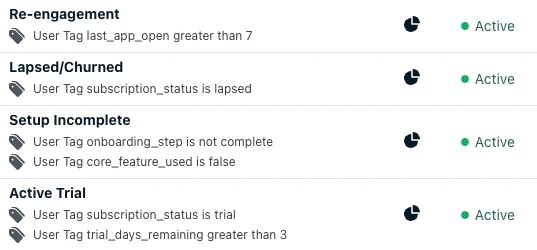
Example segments for lifecycle messaging
Lifecycle Journeys
Most mobile-first revenue and churn happens at five lifecycle transitions, and a different Journey drives each one. With Tags, Custom Events, and segments in place, build messaging flows against them. Mobile-first apps mix channels by intent: push and in-app for real-time nudges, email for deeper conversion content, and SMS for high-intent moments like trial expiration and renewal. Most use cases below are Journeys, but some (like prompting for push permissions) use in-app messages alone. Most mobile-first users move through five lifecycle stages, with a different Journey driving each transition: The lifecycle above has four Journey flows driving its transitions, plus a fifth event-driven category for cross-cutting moments:Welcome and onboarding
Engage new users immediately and drive them to their Aha moment before the trial expires.
Trial-to-paid conversion
Convert trialists with time-based sequences that ramp up urgency as the trial ends.
Retention and re-engagement
Catch at-risk users with
Last Session thresholds before they fully disengage.Win-back
Re-engage churned subscribers with a value reminder rather than a discount.
Event-driven
React to user actions in real time, like purchase confirmation, milestones, and dunning.
More use cases
Beyond the lifecycle Journeys, mobile-first apps commonly run these standalone use cases:Daily streaks
Reward consistent engagement with daily streak reminders that drive habit formation.
Get more app store reviews
Prompt satisfied users for App Store and Google Play reviews at peak moments.
App version update prompts
Target users on outdated app versions and nudge them to update via in-app messages.
Push fallback to email or SMS
Reach users via email or SMS when push delivery fails for high-priority moments.
Best practices
- Don’t trigger the system-level push prompt at install. Capture push opt-in via an in-app message after signup, the tutorial, or first Aha moment so the prompt arrives at a natural beat with context. Use a benefit-led message (“Get notified when your trial features unlock”) rather than a generic prompt. See Prompt for push permission with in-app messages.
- Time conversion pushes to the user’s local time. Trial-ending pushes scheduled in server time fire at 3 a.m. for half your audience. Use Intelligent Delivery or Custom time per timezone so reminders land in waking hours.
- Use
core_feature_usedas a Journey exit, not just an entry. The single biggest welcome-Journey mistake is messaging users who already activated. Add thecore_feature_usedevent (or Tag) as an exit on every onboarding Journey so converted users stop receiving feature-education pushes. - Cap trial-Journey frequency at one per day. Trials are 7–14 days for most apps. Two pushes a day for that window will burn through your hard-won opt-in. Use a Journey-level frequency cap and let in-app messages carry the higher-frequency nudges.
- Suppress promotional messaging during open support tickets. Listen for
support_contactedand add a suppression filter (e.g., “nosupport_resolvedevent in last 3 days”) to upsell and renewal Journeys. A renewal nudge during an active complaint reads as tone-deaf. - Deep link every push to a specific screen. A notification that opens the app home screen instead of the relevant content squanders most of the conversion value. Set a deep link on every Journey message so tapping the notification takes the user directly to the intended destination. See Deep linking.
Measure success
Measure success by these metrics, not just opens or CTR:- Core action completion rate of new users (
core_feature_usedTag set) - Trial-to-paid conversion rate (
trial_convertedovertrial_started) - Weekly Active Users (WAU) trend over time
- Retention curve at Day 7 / 14 / 30 from signup
FAQ
Should I use a Tag or a Custom Event for a given signal?
Use a Custom Event when you want to trigger a Journey or count an occurrence (e.g.,trial_started, core_feature_used). Use a Tag when you want to segment on the user’s current state or set a Journey exit condition (e.g., account_type = "trial", core_feature_used = "1"). Many signals deserve both: fire the event in the moment, then update the Tag to reflect the new state.
How often should I message trial users?
At most one push per day during the trial window, plus in-app messages. Trials are short (typically 7–14 days), and over-messaging during the trial is the fastest way to lose hard-won opt-in. Use a Journey-level frequency cap to enforce this, and watch your push opt-out rate by Journey step; a step with disproportionate opt-outs is the earliest signal you’re being too aggressive.How do I keep converted users out of conversion Journeys?
Add an exit condition to every conversion Journey on either thetrial_converted Custom Event or account_type = "paid". Without an exit, converted users continue receiving “your trial ends in 2 days” pushes, the most common and most damaging onboarding mistake. The same pattern applies to onboarding Journeys: exit on core_feature_used or onboarding_completed so activated users stop seeing feature-education content.
Do I need data integrations to use lifecycle Journeys?
No. You can build effective welcome and retention Journeys using dashboard-only segments like “First Session” and “Last Session.” Custom Events and Tags give you more precise triggers and exit conditions, but they are not required to get started.Does this guide apply to apps with a web or desktop surface?
The patterns here apply to any subscription or freemium product, but the channel mix shifts. Apps with a meaningful web or desktop surface should layer in web push and additional segments for cross-platform users on top of this mobile-first foundation.What about apps with one-time purchases or downloadable content (DLC) instead of subscriptions?
The patterns apply, but the trial-specific Tags and Custom Events do not. Swaptrial_end_date for last_purchase_date, trial_started and trial_converted for first_purchase_completed, and the Trial Expiring segment for an at-risk segment based on Last Session. For high-value users, replace weekly_active_user with a spend-based Tag like total_spend_cents or purchase_count. See Welcome Journey: Mobile gaming for an end-to-end Journey shaped around purchases instead of subscriptions.